

NOTE: I came across something I found amusing recently. I learned that Vyatta means open. Which means I inadvertently called my project “Not Open Router”. Despite the unfortunate naming, I’ll be sticking with nVyR.
In my previous article, I went through some of the CLI features in nVyR. I used firewall rules for several of the examples, but didn’t spend much time on what the firewall itself can do. That’s what I want to cover here.
There’s quite a bit that will look familiar if you’ve used a Vyatta fork. The more interesting part, at least to me, is how much policy we can express through groups and maps instead of building a longer and longer list of rules. That changes both how the configuration reads and how much work each packet has to do.
Everything in the main part of this article is available in nVyR 0.2.0. I’ll finish with a short look at what’s planned for 0.3.0.
The familiar parts
nVyR uses Linux nftables for the firewall. If you’re coming from a Vyatta fork, the usual building blocks are there: IPv4 and IPv6 filtering, connection tracking, source and destination NAT, zone policies, logging, rate limits, and flowtables. Version 0.2.0 also includes IPv6 NAT under nat66.
There are address, port, interface, and MAC groups, along with domain and GeoIP groups. I’m not going to pretend that grouping addresses or matching a country is something new. Vyatta forks already provide familiar firewall group types, and most network engineers will be comfortable with the basic idea.
The part I want to spend more time on is combining multiple fields into a single lookup, returning different results from that lookup, and sharing runtime state between rules. These are native nftables capabilities exposed through the nVyR CLI.
Match-groups: keep the fields together
Say I want one client to reach a web server on TCP/443, and another client to reach a different server on TCP/22. If I put both clients in a source group, both servers in a destination group, and both ports in a port group, that permits every combination of those values. That’s quite a bit more access than I asked for.
A match-group keeps the relationship intact. Each entry is a combination of fields, and the packet has to match all of the fields in one entry. For this example, I’m using source address, destination address, protocol, and destination port:
set firewall group match-group ipv4 CLIENT_ACCESS description "Client-to-service permissions"
set firewall group match-group ipv4 CLIENT_ACCESS match source-address destination-address protocol destination-port
set firewall group match-group ipv4 CLIENT_ACCESS counter
set firewall group match-group ipv4 CLIENT_ACCESS last-used

set firewall group match-group ipv4 CLIENT_ACCESS entry WEB source-address 192.0.2.10 destination-address 198.51.100.10 protocol tcp destination-port 443
set firewall group match-group ipv4 CLIENT_ACCESS entry SSH source-address 192.0.2.11 destination-address 198.51.100.20 protocol tcp destination-port 22
The rule that uses the group supplies the action:
set firewall ipv4 forward filter rule 100 match-group CLIENT_ACCESS action accept
Now 192.0.2.10 can match the HTTPS entry, and 192.0.2.11 can match the SSH entry. Swapping the clients, servers, or ports does not create another allowed combination. We can add more permissions to the group without adding another firewall rule for each one.
Here’s the actual group output from a 0.2.0 test router, before sending any traffic through it:
nvyr@nvyr:~$ show firewall group match-group ipv4 CLIENT_ACCESS
========================================================================
IPv4 match-group CLIENT_ACCESS

Description
-----------------------------
Client-to-service permissions

Entry    Source address    Destination address    Protocol    Destination port      Packets    Bytes  Last used    Description
-------  ----------------  ---------------------  ----------  ------------------  ---------  -------  -----------  -------------
WEB      192.0.2.10        198.51.100.10          tcp         443                         0        0  Never
SSH      192.0.2.11        198.51.100.20          tcp         22                          0        0  Never
The counters and last-used values belong to the individual entries. That’s useful when one rule represents a large number of permissions: I can still see which entries are being used. As with any rule counter, traffic accepted earlier by a global established/related policy won’t reach this lookup.
Addresses and ports aren’t the only available keys. Depending on the family and hook, match-groups can also use interfaces, MAC addresses, connection metadata, marks, DSCP, ICMP fields, and TCP flags. The CLI validates those combinations and the hooks where they can be used.
Maps: the lookup also chooses the result
A match-group answers whether the packet belongs to the group. A map takes that a step further and returns a result. For filtering, that can be an accept, drop, continue, return, or a jump to a named chain.
Here’s an alternative to the previous example. This map accepts one client’s HTTPS traffic, explicitly drops another client’s HTTPS traffic, and drops anything else that reaches the map:
set firewall group map ipv4 CLIENT_POLICY match source-address destination-address protocol destination-port
set firewall group map ipv4 CLIENT_POLICY result-type verdict
set firewall group map ipv4 CLIENT_POLICY counter

set firewall group map ipv4 CLIENT_POLICY entry WEB source-address 192.0.2.10 destination-address 198.51.100.10 protocol tcp destination-port 443 result action accept
set firewall group map ipv4 CLIENT_POLICY entry BLOCKED source-address 192.0.2.12 destination-address 198.51.100.10 protocol tcp destination-port 443 result action drop
set firewall group map ipv4 CLIENT_POLICY default-result action drop

set firewall ipv4 forward filter rule 100 map CLIENT_POLICY
These are alternative examples, so I would use either the match-group rule or the map rule at rule 100. The map rule does not need a separate action because its result supplies the verdict.
The default-result is particularly useful. Without one, a lookup miss continues to the following rule. With default-result action drop, a miss is handled by the map itself. It only applies to packets that actually reach this map; it doesn’t replace the rest of the firewall’s processing order.
nvyr@nvyr:~$ show firewall group map ipv4 CLIENT_POLICY
========================================================================
IPv4 map CLIENT_POLICY

Entry    Source address    Destination address    Protocol    Destination port    Result      Packets    Bytes  Description
-------  ----------------  ---------------------  ----------  ------------------  --------  ---------  -------  -------------
WEB      192.0.2.10        198.51.100.10          tcp         443                 accept            0        0
BLOCKED  192.0.2.12        198.51.100.10          tcp         443                 drop              0        0

default  *                 *                      *           *                   drop              0        0
Entry names such as WEB and BLOCKED identify the entries. They aren’t rule numbers or evaluation priorities. If I need ordered exceptions, I can put those in ordinary rules before the map.
Maps also support address, port, and combined address/port results for NAT. For example, a protocol and external-port lookup can select both the internal destination and its translated port:
set firewall group map ipv4 PORT_FORWARD match protocol destination-port
set firewall group map ipv4 PORT_FORWARD result-type address-port
set firewall group map ipv4 PORT_FORWARD entry HTTPS protocol tcp destination-port 443 result address 10.0.0.10 port 8443

set nat destination rule 100 inbound-interface eth0 map PORT_FORWARD
That gives me a way to maintain a collection of port forwards in one map. The corresponding filtering policy is still separate; a destination translation is not, by itself, permission to forward the packet.
Dynamic groups can remember more than an address
One use case I’ve already put into my own router is remembering traffic that has been logged and dropped. I want to log the first occurrence, then drop repeats early without filling the log with the same traffic.
Remembering only the source address is broader than I want. Instead, I can learn the source address, destination address, protocol, and destination port together:
set firewall group match-group ipv4 RECENT_DROPS match source-address destination-address protocol destination-port
set firewall group match-group ipv4 RECENT_DROPS dynamic timeout 10m
set firewall group match-group ipv4 RECENT_DROPS counter

set firewall ipv4 input filter rule 10 match-group RECENT_DROPS action drop
My normal allow rules go after that early lookup. At the end of the policy, traffic that wasn’t allowed is added to the group, then logged and dropped. This example learns TCP tuples:
set firewall ipv4 input filter rule 10005 protocol tcp add-to-group match-group RECENT_DROPS action continue
set firewall ipv4 input filter rule 10010 log action drop
The learning and final drop are deliberately separate rules. If the dynamic group reaches its capacity and cannot add an entry, the packet still needs to reach the drop rule.
A repeat of the same tuple hits rule 10 while the learned entry exists. Another destination or service is a different tuple, so it still gets evaluated against the rest of the policy. This is a temporary cache of a policy decision, not connection tracking or flowtable offload. If I change an allow policy, I also need to account for any previously learned drops that haven’t expired yet.
Groups for shared state and logging
There are a few other group types worth calling out because they solve different problems:
- ICMP groups collect types, or type/code pairs. This is useful for allowing a deliberate set of ICMPv4 or ICMPv6 messages without scattering those choices through multiple rules.
- Limit groups share a rate allowance across several rules. They can use a single shared bucket or separate buckets keyed by fields such as source address.
- Counter groups combine statistics from multiple firewall or NAT rules, including rules in different address families.
- Quota groups share a cumulative byte allowance across rules and address families. Unlike a rate limit, this is a volume budget without an automatic refill interval.
- Log groups send selected packets through a named NFLOG collector to a dedicated log file, keeping that traffic together for inspection.
- Timeout groups define named connection-tracking timeout policies that rules assign to selected traffic. I can change the tracking lifetime for a particular service without changing the global timeout for every connection.
For a simple shared-counter example, I can count selected IPv4 and IPv6 drops together:
set firewall group counter-group POLICY_DROPS description "Combined policy drops"
set firewall ipv4 input filter rule 10010 counter group POLICY_DROPS
set firewall ipv6 input filter rule 10010 counter group POLICY_DROPS action drop

run show firewall group counter-group POLICY_DROPS
A shared limit is different from copying an identical limit onto two rules. If SSH and HTTPS use the same per-source limit group, a source consumes the same allowance through either rule. That matters if the intention is a combined budget. These are packet or byte limits, though, not application-level counts of failed login attempts.
A single place for family-neutral policy
nVyR also has an inet rule tree for policy that doesn’t need IPv4 or IPv6 addresses. For example, if I want to allow forwarding from a trusted inside interface for either family:
set firewall inet forward filter rule 10 inbound-interface eth1 action accept
At the hook, global processing comes first, followed by the inet rules and then the matching IPv4 or IPv6 rules. An accept in the inet section can therefore avoid repeating the same interface-based policy in both families. The inet scope also has its own match-groups, maps, limit groups, and timeout groups, with fields restricted to what makes sense there.
There are ingress hooks for earlier filtering, too, along with packet and connection marks, DSCP, TTL/hop-limit changes, and TCP MSS adjustment at supported hooks. The available syntax follows the hook’s capabilities, so connection-dependent matches aren’t offered on an ingress path where they can’t work.
Zone policies are another way to organize filtering, but one behavior is worth making explicit: traffic not handled by a zone policy can reach the normal hook’s default action. An unassigned interface is not automatically a drop. I can keep input’s default action at accept while building the policy, verify that management traffic reaches the intended allow rule, and then change the default to drop.
Seeing what the packet actually did
Counters tell me a rule matched. Sometimes I need to know how a packet got there, which chains it visited, or where its path diverged from what I expected. For that, nVyR exposes nftables tracing and a reader that turns the trace into a more useful story.
set firewall ipv4 prerouting raw rule 10 source-address 192.0.2.10 protocol tcp destination-port 443 nftrace action continue
commit

run monitor firewall trace duration 30s save /config/traces/application.jsonl
run show firewall trace /config/traces/application.jsonl
run show firewall trace /config/traces/application.jsonl id <trace-id>
The rule selects the traffic to trace. The operational command collects it for a bounded period and can save it for later inspection. The first show command lists the captured traces; I select an ID from that list to read its story. The story includes the packet’s path, observed verdicts, tables and chains visited, and the rules that matched. Seeing a chain in the path even when it didn’t match a rule is useful information, rather than something to discard.
Here’s an example from a captured TCP SYN that was dropped by forward rule 20. The interfaces tr-in and tr-out are from the test setup:
nvyr@nvyr:~$ show firewall trace /config/traces/drop.jsonl id b1229338
Trace b1229338
════════════════════════════════════════════════════════════════════════════

Flow       TCP 192.0.2.2:43118 → 198.51.100.2:9000
Ingress    tr-in
Egress     tr-out

STORY
────────────────────────────────────────────────────────────────────────────
• The packet arrived on interface "tr-in" with TCP SYN set.
• The forwarding path used egress interface "tr-out" (L5).
• TTL changed from 64 to 63 (L5).
• Rule 20 in IPv4 forward firewall dropped (L7).
• Last observed verdict: DROP at firewall ipv4 forward filter rule 20 (L7).

TABLES AND CHAINS VISITED
────────────────────────────────────────────────────────────────────────────
Table             Chain         Evidence    What happened
----------------  ------------  ----------  -----------------------------------
inet nvyr_filter  prerouting    L2          Base-chain policy: ACCEPT
inet nvyr_filter  forward       L5          Jumped to the IPv4 forward firewall
inet nvyr_filter  ipv4_forward  L7          Rule 20: dropped

RULES HIT
────────────────────────────────────────────────────────────────────────────
L3  firewall inet prerouting raw
      Enabled tracing; continued.

L6  firewall inet forward filter
      Jumped to the IPv4 forward firewall.

L7  firewall ipv4 forward filter rule 20
      Description: deny
      Dropped.

OBSERVED CHANGES
────────────────────────────────────────────────────────────────────────────
Location    Field    Before    After
----------  -------  --------  -------
L5          TTL      64        63

OUTCOME
────────────────────────────────────────────────────────────────────────────
DROP — last observed decision at firewall ipv4 forward filter rule 20 (L7).
That tells me where to look: firewall ipv4 forward filter rule 20. I can also see the ingress and egress interfaces, the TTL change, and the path through the firewall before the drop. The L references point back to the captured evidence.
The collection timer stops the monitor; it doesn’t remove the configured tracing rule. I remove that rule when I’m finished troubleshooting.
What happens with 50,000 rules?
All of this is easier to appreciate with some numbers. I used TRex to compare three ways of representing the same four-field policy: individual rules, a verdict map, and a concatenated match-group. Each policy matched source address, destination address, protocol, and destination port.
The router under test was an Intel Atom C3758 with eight cores, roughly 16 GB of RAM, and Intel X553 10 GbE interfaces. The generator was an i9-13900H system with Intel X710 interfaces, connected to the router through two 10 GbE links. Traffic ran in both directions.
I tested 50, 250, 500, 1,000, 2,500, 5,000, 10,000, 20,000, and 50,000 entries. Those counts are the total per address family, split equally between the two directions. The traffic stayed at 1,024 fixed UDP tuples per direction, so 2,048 in total, throughout the suite. Matching entries were distributed through the policy, with nonmatching entries filling out the larger configurations. At the smaller sizes, some tuples reached the default accept; the verdict map used its default-result for those misses.
Connection tracking was bypassed with notrack. There was no NAT, flowtable acceleration, logging, or per-entry tracking in these throughput runs. The purpose was to measure the lookup cost, rather than have established-state handling or offload skip the policy being tested.
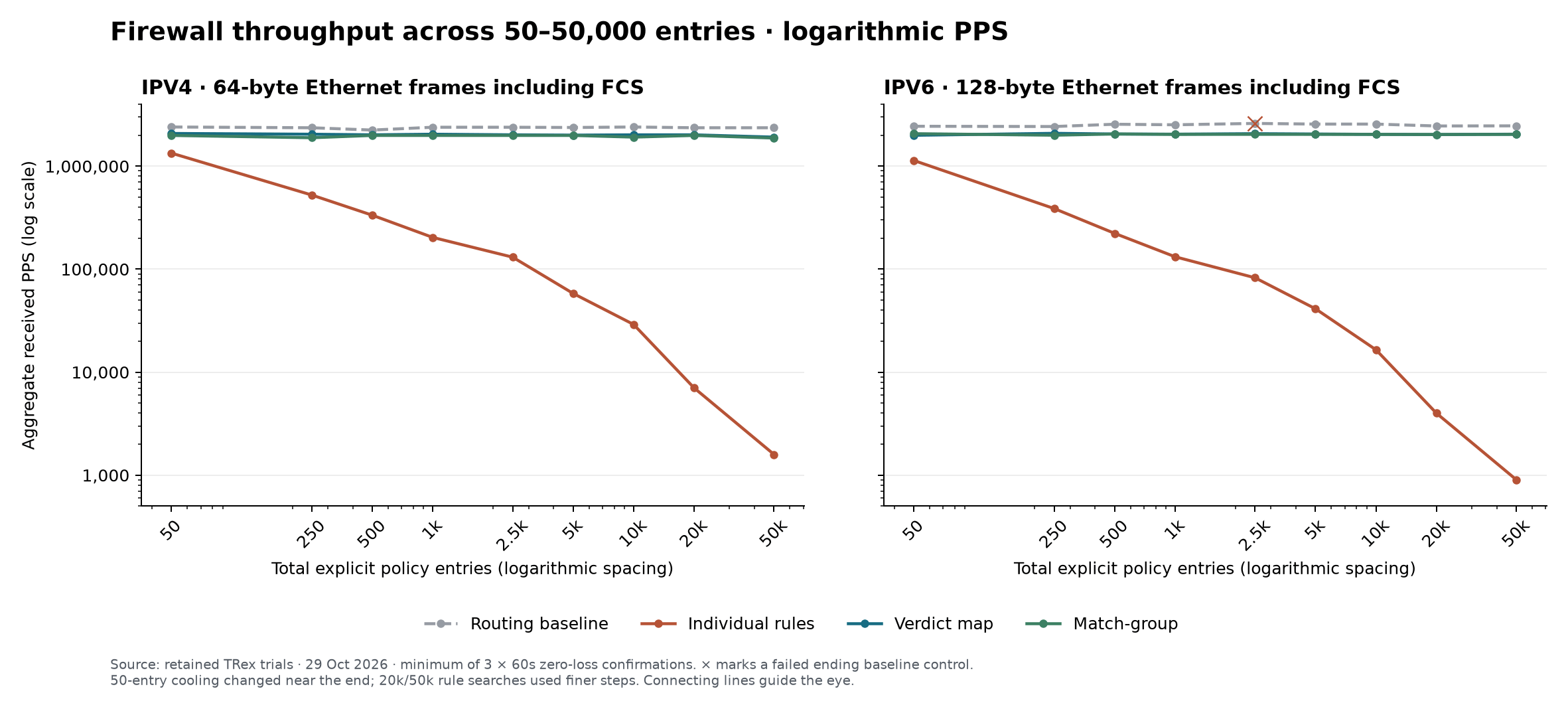
Here are the 50,000-entry results. These are aggregate received packets per second, not the rate on each individual port:
| Configuration | IPv4 PPS | IPv6 PPS |
|---|---|---|
| Routing baseline | 2,360,754 | 2,463,903 |
| 50,000 individual rules | 1,589 | 902 |
| Verdict map, 50,000 entries | 1,914,832 | 2,045,089 |
| Match-group, 50,000 entries | 1,875,487 | 2,037,253 |
That’s a very large difference. At 50,000 entries, the maps and match-groups retained roughly 79–83% of the routing baseline. Across the full suite, they stayed around 1.88–2.08 million packets per second. The individual-rule case dropped sharply as the packet had to work through more rules to find its match.
The small difference between the map and match-group results isn’t enough for me to declare one universally faster. The useful finding is how both behaved as the policy grew. I would choose between them based on whether I need membership with a common action, or a lookup that returns different results.
A few details matter when reading those numbers. IPv4 used 64-byte Ethernet frames and IPv6 used 128-byte frames, including FCS, so this is not a direct comparison of IPv4 against IPv6. Each reported policy result is the lowest received rate from three 60-second confirmations with no observed loss at the selected offered rate. It’s a repeatable workload measurement, not a claim to have found the exact maximum capacity.
This benchmark compares three policy representations within nVyR. All three configurations used the same underlying nftables implementation. What it demonstrates is the benefit of expressing a large policy as a lookup instead of thousands of sequential rules.
Choosing the right tool for the policy
I still use ordinary firewall rules. They’re easy to read, ordered exceptions are straightforward, and a small policy doesn’t need to be turned into a map just because the feature exists.
A good example at enterprise scale is the Port Open Request (POR) process. A request will typically specify a source address, destination address, destination port, and protocol. Over time, those requests can turn into thousands of firewall rules that all match the same four fields, just with different values.
That’s a natural fit for a match-group or map. Each approved combination can be an entry in a match-group with a shared accept rule, or a map entry when the result needs to vary. If you have 50,000 rules built around those same match parameters, moving that policy into lookups can radically improve throughput, as the testing above shows. You still retain the specific source-to-destination permissions from each request; you’re changing how the firewall looks them up.
Where I find the groups useful is when the policy starts repeating itself. A match-group keeps related fields together. A map lets those combinations choose different outcomes. Dynamic groups remember selected traffic, while shared limits and counters let several rules participate in the same runtime object. Those are useful choices to have in the CLI without maintaining a separate nftables script alongside the router configuration.
For the full syntax and supported fields, the 0.2.0 user documentation is the reference. The GitHub releases page has the images and release notes if you want to try it.
Coming in 0.3.0
The next addition in this area is list-backed firewall groups, including CSV-backed match-groups and maps. The goal is to populate a group from external data and refresh it manually or on a schedule, rather than turn every feed update into thousands of CLI commands. Multiple attachments will let several lists feed a single group.
That is expected as part of the 0.3.0 roadmap, and is not included in 0.2.0. I’ll cover the configuration and update behavior separately once that release is ready.



Leave a Reply